Codec Server
A Codec Server is an HTTP/HTTPS server that you host and operate. It runs your Payload Codec logic to encode and decode Payloads on behalf of the Temporal CLI and Web UI. The Codec Server is independent of the Temporal Service. Encryption keys and codec logic remain in your environment.
For setup instructions, see Codec Server setup.
Why use a Codec Server
When you apply a custom Payload Codec for encryption or compression, data stored in the Temporal Service is encoded. The Temporal Service never has access to your encryption keys, so it cannot decode this data. Without a Codec Server, the Web UI and CLI display raw encoded payloads.
A Codec Server solves this by giving the Web UI and CLI a way to decode payloads on demand, without exposing keys to the Temporal Service. Common reasons to run a Codec Server include:
- Debugging Workflows. View decoded Workflow inputs, outputs, and Event History in the Web UI instead of reading base64-encoded or encrypted blobs.
- Operating from the CLI. Use commands like
temporal workflow showandtemporal workflow executewith readable data, even when payloads are encrypted at rest. - Encoding inputs from the UI and CLI. When you start or signal a Workflow from the Web UI or CLI, the Codec Server can encode the input before it reaches the Temporal Service, so sensitive data is never sent in plaintext.
- Compliance and access control. Because the Codec Server runs in your environment, you control who can decode payloads and under what conditions. You can layer authorization on top of the decode endpoint to restrict access per user or per Namespace.
How a Codec Server works
A Codec Server follows the Temporal Codec Server Protocol. It exposes two HTTP POST endpoints:
/encodeaccepts plaintext payloads and returns encoded payloads./decodeaccepts encoded payloads and returns decoded payloads.
Both endpoints receive and respond with a JSON body containing a payloads array of Payload
objects. The Codec Server passes each payload through your Payload Codec, which applies the same
encoding or decoding logic that your Workers use.
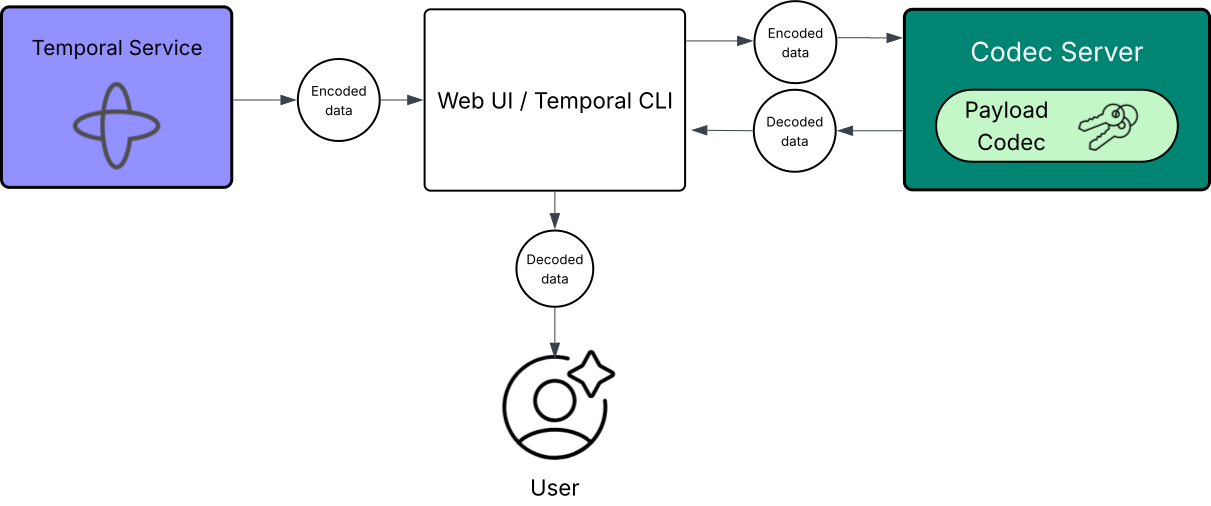
Codec Server
When the Web UI or CLI needs to display decoded data, it sends the encoded payloads to your Codec Server's /decode
endpoint. The Codec Server decodes the payloads and returns them to the client. Decoding happens entirely on the client
side. The Temporal Service never sees the decoded data.
The /encode endpoint works in the other direction. When you start a Workflow or send a Signal from the Web UI or CLI,
the input is sent to the Codec Server's /encode endpoint first, so data reaches the Temporal Service in its encoded
form.
Your Codec Server should use the same Payload Codec implementation as your Workers to ensure consistent encoding and decoding.
Codec Server vs. Payload Codec
A Codec Server runs a Payload Codec internally, so the two are directly connected. The difference is where the codec logic runs and who calls it.
| Payload Codec | Codec Server | |
|---|---|---|
| Purpose | Encodes and decodes Payloads. Applies encryption, compression, or other byte-level transformations. | Hosts a Payload Codec as an HTTP service so the Web UI and CLI can encode and decode Payloads remotely. |
| Runs where | In-process, inside your Workers and Clients. Also runs inside the Codec Server. | As a standalone HTTP service in your environment, with a Payload Codec inside it. |
| Called by | The Temporal SDK, automatically on every serialization and deserialization. | The Web UI and CLI, over HTTP, when a user views or submits Payload data. |
| Has access to encryption keys | Yes. Keys are available in the Worker or Client process. | Yes. Must be configured with the same keys the Payload Codec uses. |
You implement the transformation logic once in a Payload Codec, then host that logic in a Codec Server so the Web UI and CLI can use it remotely.
Authorization
Access to a Codec Server should be restricted because it can decode sensitive data with a single API call. Common approaches include:
- Network-level restrictions. Run the Codec Server on
localhostor behind a VPN. The Web UI can communicate with a Codec Server that is only accessible locally. - Token-based authorization. Integrate your organization's authentication provider (OAuth, Auth0, or similar). Temporal Cloud can pass access tokens (JWT) to your Codec Server with each request. Verify these tokens against the Temporal Cloud JWKS endpoint.
You may also need a key management infrastructure to share encryption keys between your Workers and the Codec Server.
SDK Codec Server samples
Most Temporal SDKs provide example Codec Server implementations: